# CVE-2018-3646

<div id="bkmrk-dieser-host-ist-pote" ng-transclude="">Dieser Host ist potenziell anfällig für in CVE-2018-3646 beschriebene Probleme; Details und VMware-Empfehlungen finden Sie in https://kb.vmware.com/s/article/55636.</div>[![grafik.png](https://mach7.space/uploads/images/gallery/2024-09/scaled-1680-/dfsfGojCuw6kQVcO-grafik.png)](https://mach7.space/uploads/images/gallery/2024-09/dfsfGojCuw6kQVcO-grafik.png)

SSH:

```bash
esxcli system settings kernel set -s hyperthreadingMitigation -v TRUE
```

Quelle: [https://knowledge.broadcom.com/external/article?legacyId=55806](https://knowledge.broadcom.com/external/article?legacyId=55806)

1. **Update Phase: Apply vSphere Updates and Patches**

<div id="bkmrk-the-sequential-conte" style="margin-left: 40px;">The <u>Sequential-context attack vector</u> is mitigated by a vSphere update to the product versions listed in VMware Security Advisory [VMSA-2018-0020](https://www.vmware.com/security/advisories/VMSA-2018-0020.html). This mitigation is dependent on Intel microcode updates (provided in separate ESXi patches for most Intel hardware platforms) which are also documented in [VMSA-2018-0020](https://www.vmware.com/security/advisories/VMSA-2018-0020.html). This mitigation is enabled by default and does not impose a significant performance impact.  
  
**Note**: As displayed in the workflow above, vCenter Server should be updated prior to applying ESXi patches. Notification messages were added in the aforementioned updates and patches to explain that the <u>ESXi Side-Channel-Aware Scheduler</u> must be enabled to mitigate the Concurrent-context attack vector of [CVE-2018-3646](https://cve.mitre.org/cgi-bin/cvename.cgi?name=CVE-2018-3646). If ESXi is updated prior to vCenter you may receive cryptic notification messages relating to this. After vCenter has been updated, the notifications will be shown correctly.</div>2. **Planning Phase: Assess Your Environment**

<div id="bkmrk-the-concurrent-conte" style="margin-left: 40px;">The <u>Concurrent-context attack vector</u> is mitigated through enablement of the <u>ESXi Side-Channel-Aware Scheduler</u> which is included in the updates and patches listed in [VMSA-2018-0020](https://www.vmware.com/security/advisories/VMSA-2018-0020.html). This scheduler is not enabled by default. Enablement of this scheduler may impose a non-trivial performance impact on applications running in a vSphere environment. The goal of the Planning Phase is to understand if your current environment has sufficient CPU capacity to enable the scheduler without operational impact.</div><div id="bkmrk-the-following-list-s" style="margin-left: 40px;">  
The following list summarizes potential problem areas after enabling the <u>ESXi Side-Channel-Aware Scheduler</u>:</div>- VMs configured with vCPUs greater than the physical cores available on the ESXi host
- VMs configured with custom affinity or NUMA settings
- VMs with latency-sensitive configuration
- ESXi hosts with Average CPU Usage greater than 70%
- Hosts with custom CPU resource management options enabled
- HA Clusters where a rolling upgrade will increase Average CPU Usage above 100%

<div id="bkmrk-important%3A-the-above" style="margin-left: 40px;">**Important**: The above list is meant to be a brief overview of potential problem areas related to enablement of the <u>ESXi Side-Channel-Aware Scheduler</u>. </div><div id="bkmrk-note%3A-it-may-be-nece" style="margin-left: 40px;">  
**Note**: It may be necessary to acquire additional hardware, or rebalance existing workloads, before enablement of the <u>ESXi Side-Channel-Aware Scheduler</u>. Organizations can choose not to enable the <u>ESXi Side-Channel-Aware Scheduler</u> after performing a risk assessment and accepting the risk posed by the <u>Concurrent-context attack vector</u>. This is NOT RECOMMENDED and VMware cannot make this decision on behalf of an organization.</div>3. **Scheduler-Enablement Phase:** 
    1. **Enable the <u>ESXi Side-Channel-Aware Scheduler</u> in ESXi 5.5, 6.0, 6.5, and 6.7 (prior to 6.7u2) and 7.0.**

<div id="bkmrk-after-addressing-the" style="margin-left: 80px;">After addressing the potential problem areas described above during the Planning Phase, the <u>ESXi Side-Channel-Aware Scheduler</u> must be enabled to mitigate the <u>Concurrent-context attack vector</u> of [CVE-2018-3646](https://cve.mitre.org/cgi-bin/cvename.cgi?name=CVE-2018-3646). The scheduler can be enabled on an individual ESXi host via the advanced configuration option *hyperthreadingMitigation*. </div><div id="bkmrk-%C2%A0-1" style="margin-left: 40px;"> </div><div id="bkmrk-notes%3A" style="margin-left: 80px;">**Notes**:</div>- Enabling this option will result in the vSphere UI reporting only a single logical processor per physical core; halving the number of logical processors if Hyperthreading was previously enabled. In addition Hyperthreading may be reported as 'Disabled' in various configuration tabs.
- The current <u>ESXi Side-Channel-Aware scheduler</u> also addresses [CVE-2018-5407](https://cve.mitre.org/cgi-bin/cvename.cgi?name=CVE-2018-5407).

<div id="bkmrk-enabling-the-esxi-si" style="margin-left: 80px;">Enabling the <u>ESXi Side-Channel-Aware Scheduler</u> using the vSphere Web Client or vSphere Client</div>1. <div>Connect to the vCenter Server using either the vSphere Web or vSphere Client.</div>
2. <div>Select an ESXi host in the inventory.</div>
3. <div>Click the **Manage** (5.5/6.0) or Configure (6.5/6.7/7.0) tab.</div>
4. <div>Click the **Settings** sub-tab.</div>
5. <div>Under the System heading, click **Advanced System Settings**.</div>
6. <div>Click in the Filter box and search <span style="font-family: courier new,courier,monospace;">VMkernel.Boot.hyperthreadingMitigation</span></div>
7. <div>Select the setting by name and click the **Edit** pencil icon.</div>
8. <div>Change the configuration option to true (default: false).</div>
9. <div>Click **OK**.</div>
10. <div>Reboot the ESXi host for the configuration change to go into effect.</div>

<div id="bkmrk-enabling-the-esxi-si-1" style="margin-left: 80px;">Enabling the <u>ESXi Side-Channel-Aware Scheduler</u> using ESXi Embedded Host Client</div>1. <div>Connect to the ESXi host by opening a web browser to https://*HOSTNAME*.</div>
2. <div>Click the **Manage** tab.</div>
3. <div>Click the **Advanced settings** sub-tab.</div>
4. <div>Click in the Filter box and search <span style="font-family: courier new,courier,monospace;">VMkernel.Boot.hyperthreadingMitigation</span></div>
5. <div>Select the setting by name and click the **Edit** pencil icon.</div>
6. <div>Change the configuration option to true (default: false).</div>
7. <div>Click **Save**.</div>
8. <div>Reboot the ESXi host for the configuration change to go into effect.</div>

<div id="bkmrk-enable-esxi-side-cha" style="margin-left: 40px;"><div style="margin-left: 40px;">Enable <u>ESXi Side-Channel-Aware Scheduler</u> setting using ESXCLI</div>1. <div>SSH to an ESXi host or open a console where the remote ESXCLI is installed. For more information, see the [ESXCLI Developer Portal](https://developer.broadcom.com/tools/esxcli/latest).</div>
2. <div>Check the current runtime value of the HTAware Mitigation Setting by running <span style="font-family: courier new,courier,monospace;">esxcli system settings kernel list -o hyperthreadingMitigation</span></div>
3. <div>To enable HT Aware Mitigation, run this command:</div>

<div style="margin-left: 80px;"><span style="font-family: courier new,courier,monospace;">esxcli system settings kernel set -s hyperthreadingMitigation -v TRUE</span></div>4. Reboot the ESXi host for the configuration change to go into effect.

</div>2. **<span style="font-family: metropolisregular,serif;"><span style="font-size: 10.5pt;">Enable the <u>ESXi Side-Channel-Aware Scheduler</u> (SCAv1) or the <u>ESXi Side-Channel-Aware Scheduler v2 </u>(SCAv2) in ESXi 6.7u2 (13006603) or later </span></span>**

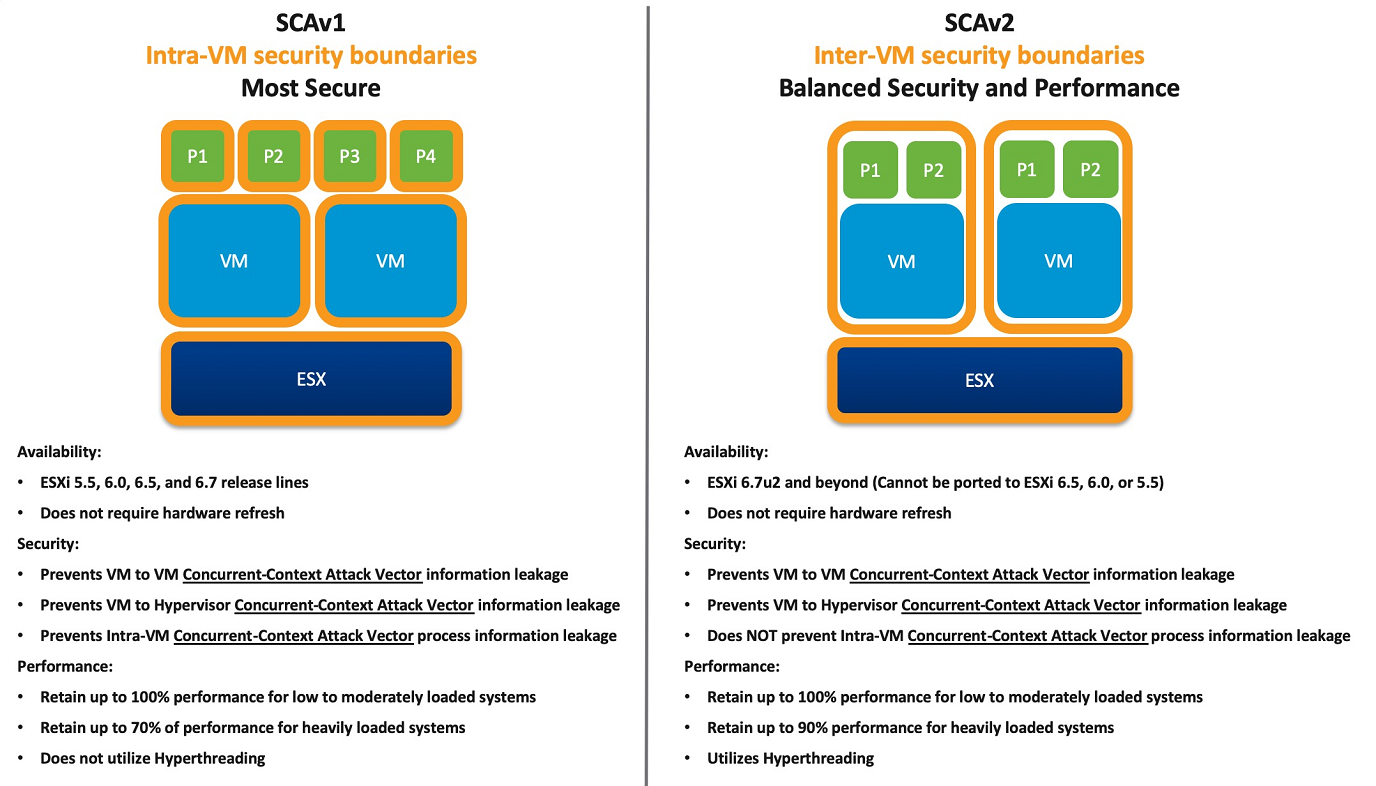
<div id="bkmrk-note%3A%C2%A0esxi-6.7u2-%2813" style="margin-left: 80px;"><span style="font-family: metropolisregular,serif;"><span style="font-size: 10.5pt;">**Note**</span></span>**<span style="font-family: metropolisregular,serif;"><span style="font-size: 10.5pt;">: </span></span>**<span style="font-family: metropolisregular,serif;"><span style="font-size: 10.5pt;">ESXi 6.7u2 (13006603) and future release lines of ESXi include the<u> ESXi Side-Channel-Aware Scheduler v2</u>. Prior release lines such as 6.5, 6.0, and 5.5 cannot accommodate this new scheduler.</span></span></div><div id="bkmrk-%C2%A0-2" style="margin-left: 40px;"> </div><div id="bkmrk-%C2%A0-3" style="margin-left: 80px;">![](https://api-broadcomcms-software.wolkenservicedesk.com/attachment/get_attachment_content?uniqueFileId=1512272017699)  
 </div><div id="bkmrk-vmware-has-published" style="margin-left: 80px;"><span style="font-family: metropolisregular,serif;"><span style="font-size: 10.5pt;">VMware has published a white paper entitled [Performance of vSphere 6.7 Scheduling Options](https://www.vmware.com/techpapers/2018/scheduler-options-vsphere67u2-perf.html) which provides a more detailed look into the performance differences between SCAv1 and SCAv2. Please review this document before continuing.</span></span></div><div id="bkmrk-enabling-the%C2%A0esxi-si" style="margin-left: 80px;"><span style="font-family: metropolisregular,serif;"><span style="font-size: 10.5pt;">Enabling the <u>ESXi Side-Channel-Aware Scheduler</u> <u>(SCAv1)</u> using the vSphere Web Client or vSphere Client</span></span></div>1. <span style="font-family: metropolisregular,serif;"><span style="font-size: 10.5pt;">Connect to the vCenter Server using either the vSphere Web or vSphere Client.</span></span>
2. <span style="font-family: metropolisregular,serif;"><span style="font-size: 10.5pt;">Select an ESXi host in the inventory.</span></span>
3. <span style="font-family: metropolisregular,serif;"><span style="font-size: 10.5pt;">Click the Configure tab.</span></span>
4. <span style="font-family: metropolisregular,serif;"><span style="font-size: 10.5pt;">Under the System heading, click **Advanced System Settings**.</span></span>
5. <span style="font-family: metropolisregular,serif;"><span style="font-size: 10.5pt;">Click **Edit**.</span></span>
6. <span style="font-family: metropolisregular,serif;"><span style="font-size: 10.5pt;">Click in the Filter box and search </span></span><span style="font-family: courier new;"><span style="font-size: 10.5pt;">VMkernel.Boot.hyperthreadingMitigation.</span></span>
7. <span style="font-family: metropolisregular,serif;"><span style="font-size: 10.5pt;">Select the setting by name.</span></span>
8. <span style="font-family: metropolisregular,serif;"><span style="font-size: 10.5pt;">Change the configuration option to true (default: false).</span></span>
9. <span style="font-family: metropolisregular,serif;"><span style="font-size: 10.5pt;">Click in the Filter box and search <span style="font-family: courier new,courier,monospace;">VMkernel.Boot.hyperthreadingMitigationIntraVM.</span></span></span>
10. <span style="font-family: metropolisregular,serif;"><span style="font-size: 10.5pt;">Change the configuration option to true (default: true).</span></span>
11. <span style="font-family: metropolisregular,serif;"><span style="font-size: 10.5pt;">Click **OK**.</span></span>
12. <span style="font-family: metropolisregular,serif;"><span style="font-size: 10.5pt;">Reboot the ESXi host for the configuration change to go into effect.</span></span>

<div id="bkmrk-enabling-the%C2%A0esxi-si-1" style="margin-left: 80px;"><span style="font-family: metropolisregular,serif;"><span style="font-size: 10.5pt;">Enabling the <u>ESXi Side-Channel-Aware Scheduler</u> (SCAv1) using ESXi Embedded Host Client</span></span></div>1. <span style="font-family: metropolisregular,serif;"><span style="font-size: 10.5pt;">Connect to the ESXi host by opening a web browser to https://*HOSTNAME*.</span></span>
2. <span style="font-family: metropolisregular,serif;"><span style="font-size: 10.5pt;">Click **Manage** under host navigator.</span></span>
3. <span style="font-family: metropolisregular,serif;"><span style="font-size: 10.5pt;">Click the **Advanced settings** Tab.</span></span>
4. <span style="font-family: metropolisregular,serif;"><span style="font-size: 10.5pt;">Use the search box to find </span></span><span style="font-family: courier new;"><span style="font-size: 10.5pt;">VMkernel.Boot.hyperthreadingMitigation</span></span>
5. <span style="font-family: metropolisregular,serif;"><span style="font-size: 10.5pt;">Select the </span></span><span style="font-family: courier new;"><span style="font-size: 10.5pt;">VMkernel.Boot.hyperthreadingMitigation</span></span><span style="font-family: metropolisregular,serif;"><span style="font-size: 10.5pt;"> setting and click the **Edit** Option.</span></span>
6. <span style="font-family: metropolisregular,serif;"><span style="font-size: 10.5pt;">Change the configuration option to true (default: false).</span></span>
7. <span style="font-family: metropolisregular,serif;"><span style="font-size: 10.5pt;">Click **Save.**</span></span>
8. <span style="font-family: metropolisregular,serif;"><span style="font-size: 10.5pt;">Use the search box to find </span></span><span style="font-family: courier new;"><span style="font-size: 10.5pt;">VMkernel.Boot.hyperthreadingMitigationIntraVM.</span></span>
9. <span style="font-family: metropolisregular,serif;"><span style="font-size: 10.5pt;">Select the </span></span><span style="font-family: courier new;"><span style="font-size: 10.5pt;">VMkernel.Boot.hyperthreadingMitigationIntraVM</span></span><span style="font-family: metropolisregular,serif;"><span style="font-size: 10.5pt;"> setting and click the **Edit** Option.</span></span>
10. <span style="font-family: metropolisregular,serif;"><span style="font-size: 10.5pt;">Change the configuration option to true (default: true).</span></span>
11. <span style="font-family: metropolisregular,serif;"><span style="font-size: 10.5pt;">Click **Save**.</span></span>
12. <span style="font-family: metropolisregular,serif;"><span style="font-size: 10.5pt;">Reboot the ESXi host for the configuration change to go into effect.</span></span>

<div id="bkmrk-enable%C2%A0esxi-side-cha" style="margin-left: 80px;"><span style="font-family: metropolisregular,serif;"><span style="font-size: 10.5pt;">Enable <u>ESXi Side-Channel-Aware Scheduler</u> (SCAv1) using ESXCLI</span></span></div>1. <span style="font-family: metropolisregular,serif;"><span style="font-size: 10.5pt;">SSH to an ESXi host or open a console where the remote ESXCLI is installed. For more information, see the [ESXCLI Developer Portal](https://developer.broadcom.com/tools/esxcli/latest).</span></span><span style="font-family: metropolisregular,serif;"><span style="font-size: 10.5pt;">.</span></span>
2. <span style="font-family: metropolisregular,serif;"><span style="font-size: 10.5pt;">Check the current runtime values by running </span></span><span style="font-family: courier new;"><span style="font-size: 10.5pt;">esxcli system settings kernel list -o hyperthreadingMitigation </span></span><span style="font-family: metropolisregular,serif;"><span style="font-size: 10.5pt;">and</span></span><span style="font-family: courier new;"><span style="font-size: 10.5pt;"> esxcli system settings kernel list -o hyperthreadingMitigationIntraVM.</span></span>
3. <span style="font-family: metropolisregular,serif;"><span style="font-size: 10.5pt;">To enable the <u>ESXi Side-Channel-Aware Scheduler</u> Version 1 run these commands:</span></span>
4. <span style="font-family: courier new;"><span style="font-size: 10.5pt;">esxcli system settings kernel set -s hyperthreadingMitigation -v TRUE</span></span>
5. <span style="font-family: courier new;"><span style="font-size: 10.5pt;">esxcli system settings kernel set -s hyperthreadingMitigationIntraVM -v TRUE</span></span>
6. <span style="font-family: metropolisregular,serif;"><span style="font-size: 10.5pt;">Reboot the ESXi host for the configuration change to go into effect.</span></span>

<div id="bkmrk-enabling-the%C2%A0esxi-si-2" style="margin-left: 80px;"><span style="font-family: metropolisregular,serif;"><span style="font-size: 10.5pt;">Enabling the <u>ESXi Side-Channel-Aware Scheduler</u> Version 2 (SCAv2) using the vSphere Web Client or vSphere Client</span></span></div>1. <span style="font-family: metropolisregular,serif;"><span style="font-size: 10.5pt;">Connect to the vCenter Server using either the vSphere Web or vSphere Client.</span></span>
2. <span style="font-family: metropolisregular,serif;"><span style="font-size: 10.5pt;">Select an ESXi host in the inventory.</span></span>
3. <span style="font-family: metropolisregular,serif;"><span style="font-size: 10.5pt;">Click the Configure tab.</span></span>
4. <span style="font-family: metropolisregular,serif;"><span style="font-size: 10.5pt;">Under the System heading, click **Advanced System Settings**.</span></span>
5. <span style="font-family: metropolisregular,serif;"><span style="font-size: 10.5pt;">Click **Edit.**</span></span>
6. <span style="font-family: metropolisregular,serif;"><span style="font-size: 10.5pt;">Click in the Filter box and search </span></span><span style="font-family: courier new;"><span style="font-size: 10.5pt;">VMkernel.Boot.hyperthreadingMitigation.</span></span>
7. <span style="font-family: metropolisregular,serif;"><span style="font-size: 10.5pt;">Select the setting by name.</span></span>
8. <span style="font-family: metropolisregular,serif;"><span style="font-size: 10.5pt;">Change the configuration option to true (default: false).</span></span>
9. <span style="font-family: metropolisregular,serif;"><span style="font-size: 10.5pt;">Click in the Filter box and search VMkernel.Boot.hyperthreadingMitigationIntraVM.</span></span>
10. <span style="font-family: metropolisregular,serif;"><span style="font-size: 10.5pt;">Change the configuration option to false (default: true).</span></span>
11. <span style="font-family: metropolisregular,serif;"><span style="font-size: 10.5pt;">Click **OK**.</span></span>
12. <span style="font-family: metropolisregular,serif;"><span style="font-size: 10.5pt;">Reboot the ESXi host for the configuration change to go into effect.</span></span>

<div id="bkmrk-enabling-the%C2%A0esxi-si-3" style="margin-left: 80px;"><span style="font-family: metropolisregular,serif;"><span style="font-size: 10.5pt;">Enabling the <u>ESXi Side-Channel-Aware Scheduler</u> Version 2 (SCAv2) using ESXi Embedded Host Client</span></span></div>1. <span style="font-family: metropolisregular,serif;"><span style="font-size: 10.5pt;">Connect to the ESXi host by opening a web browser to https://*HOSTNAME*.</span></span>
2. <span style="font-family: metropolisregular,serif;"><span style="font-size: 10.5pt;">Click **Manage** under host navigator.</span></span>
3. <span style="font-family: metropolisregular,serif;"><span style="font-size: 10.5pt;">Click the **Advanced settings** Tab.</span></span>
4. <span style="font-family: metropolisregular,serif;"><span style="font-size: 10.5pt;">Use the search box to find </span></span><span style="font-family: courier new;"><span style="font-size: 10.5pt;">VMkernel.Boot.hyperthreadingMitigation.</span></span>
5. <span style="font-family: metropolisregular,serif;"><span style="font-size: 10.5pt;">Select the </span></span><span style="font-family: courier new;"><span style="font-size: 10.5pt;">VMkernel.Boot.hyperthreadingMitigation</span></span><span style="font-family: metropolisregular,serif;"><span style="font-size: 10.5pt;"> setting and click the **Edit** Option.</span></span>
6. <span style="font-family: metropolisregular,serif;"><span style="font-size: 10.5pt;">Change the configuration option to true (default: false).</span></span>
7. <span style="font-family: metropolisregular,serif;"><span style="font-size: 10.5pt;">Click **Save.**</span></span>
8. <span style="font-family: metropolisregular,serif;"><span style="font-size: 10.5pt;">Use the search box to find </span></span><span style="font-family: courier new;"><span style="font-size: 10.5pt;">VMkernel.Boot.hyperthreadingMitigationIntraVM.</span></span>
9. <span style="font-family: metropolisregular,serif;"><span style="font-size: 10.5pt;">Select the </span></span><span style="font-family: courier new;"><span style="font-size: 10.5pt;">VMkernel.Boot.hyperthreadingMitigationIntraVM</span></span><span style="font-family: metropolisregular,serif;"><span style="font-size: 10.5pt;"> setting and click the **Edit** Option.</span></span>
10. <span style="font-family: metropolisregular,serif;"><span style="font-size: 10.5pt;">Change the configuration option to false (default: true).</span></span>
11. <span style="font-family: metropolisregular,serif;"><span style="font-size: 10.5pt;">Click **Save**.</span></span>
12. <span style="font-family: metropolisregular,serif;"><span style="font-size: 10.5pt;">Reboot the ESXi host for the configuration change to go into effect.</span></span>

<div id="bkmrk-enable%C2%A0esxi-side-cha-1" style="margin-left: 80px;"><span style="font-family: metropolisregular,serif;"><span style="font-size: 10.5pt;">Enable <u>ESXi Side-Channel-Aware Scheduler</u> Version 2 (SCAv2) using ESXCLI</span></span></div>1. <span style="font-family: metropolisregular,serif;"><span style="font-size: 10.5pt;">SSH to an ESXi host or open a console where the remote ESXCLI is installed. For more information, see the [ESXCLI Developer Portal](https://developer.broadcom.com/tools/esxcli/latest).</span></span><span style="font-family: metropolisregular,serif;"><span style="font-size: 10.5pt;">.</span></span>
2. <span style="font-family: metropolisregular,serif;"><span style="font-size: 10.5pt;">Check the current runtime values by running </span></span><span style="font-family: courier new;"><span style="font-size: 10.5pt;">esxcli system settings kernel list -o hyperthreadingMitigation </span></span><span style="font-family: metropolisregular,serif;"><span style="font-size: 10.5pt;">and</span></span><span style="font-family: courier new;"><span style="font-size: 10.5pt;"> esxcli system settings kernel list -o hyperthreadingMitigationIntraVM</span></span>
3. <span style="font-family: metropolisregular,serif;"><span style="font-size: 10.5pt;">To enable the <u>ESXi Side-Channel-Aware Scheduler</u> Version 1 run these commands:</span></span>
4. <span style="font-family: courier new;"><span style="font-size: 10.5pt;">esxcli system settings kernel set -s hyperthreadingMitigation -v TRUE</span></span>
5. <span style="font-family: courier new;"><span style="font-size: 10.5pt;">esxcli system settings kernel set -s hyperthreadingMitigationIntraVM -v FALSE</span></span>
6. <span style="font-family: metropolisregular,serif;"><span style="font-size: 10.5pt;">Reboot the ESXi host for the configuration change to go into effect.</span></span>

<div id="bkmrk-esxi-6.7u2-%28and-late" style="margin-left: 80px;">**<span style="font-family: metropolisregular,serif;"><span style="font-size: 10.5pt;">ESXi 6.7u2 (and later) Scheduler Configuration Summary</span></span>**</div><div id="bkmrk-hyperthreadingmitiga" style="margin-left: 80px;"><table border="1" style="width: 500px;"><tbody><tr><td colspan="1" rowspan="1" style="text-align: center;">hyperthreadingMitigation</td><td colspan="1" rowspan="1" style="text-align: center;">hyperthreadingMitigationIntraVM</td><td colspan="1" rowspan="1" style="text-align: center;">Scheduler Enabled</td></tr><tr><td colspan="1" rowspan="1" style="text-align: center;">FALSE</td><td colspan="1" rowspan="1" style="text-align: center;">TRUE or FALSE</td><td colspan="1" rowspan="1">Default scheduler (unmitigated)</td></tr><tr><td colspan="1" rowspan="1" style="text-align: center;">TRUE</td><td colspan="1" rowspan="1" style="text-align: center;">TRUE</td><td colspan="1" rowspan="1">SCAv1</td></tr><tr><td colspan="1" rowspan="1" style="text-align: center;">TRUE</td><td colspan="1" rowspan="1" style="text-align: center;">FALSE</td><td colspan="1" rowspan="1">SCAv2</td></tr></tbody></table>

</div>  
<u>**HTAware Mitigation Tool**</u>  
  
VMware has provided a tool to assist in performing both the **Planning Phase** and the **Scheduler-Enablement Phase** at scale. This tool has been updated to include SCAv2 support and can be found in [HTAware Mitigation Tool Overview and Usage (328935)](https://knowledge.broadcom.com/external/article?legacyId=56931) along with detailed instructions on its usage, capabilities, and limitations.  
  
**Table 1**: Affected Intel Processors Supported by ESXi

<table border="1" cellpadding="0" cellspacing="0" id="bkmrk-intel-code-name-fms-" style="width: 546px;" width="546"><tbody><tr><td colspan="1" rowspan="1" style="width: 126px;">**<span style="font-family: calibri,sans-serif;"><span style="font-size: 10.0pt;">Intel Code Name</span></span>**</td><td colspan="1" rowspan="1" style="width: 68px;">**<span style="font-family: calibri,sans-serif;"><span style="font-size: 10.0pt;">FMS</span></span>**</td><td colspan="1" rowspan="1" style="width: 352px;">**<span style="font-family: calibri,sans-serif;"><span style="font-size: 10.0pt;">Intel Brand Names</span></span>**</td></tr><tr><td colspan="1" rowspan="1" style="width: 126px;"><span style="font-family: calibri,sans-serif;"><span style="font-size: 9.0pt;">Nehalem-EP</span></span></td><td colspan="1" rowspan="1" style="width: 68px;"><span style="font-family: courier new;"><span style="font-size: 9.0pt;">0x106a5</span></span></td><td colspan="1" rowspan="1" style="width: 352px;"><span style="font-family: calibri,sans-serif;"><span style="font-size: 8.0pt;">Intel Xeon 35xx Series;  
Intel Xeon 55xx Series</span></span></td></tr><tr><td colspan="1" rowspan="1" style="width: 126px;"><span style="font-family: calibri,sans-serif;"><span style="font-size: 9.0pt;">Lynnfield</span></span></td><td colspan="1" rowspan="1" style="width: 68px;"><span style="font-family: courier new;"><span style="font-size: 9.0pt;">0x106e5</span></span></td><td colspan="1" rowspan="1" style="width: 352px;"><span style="font-family: calibri,sans-serif;"><span style="font-size: 8.0pt;">Intel Xeon 34xx Lynnfield Series</span></span></td></tr><tr><td colspan="1" rowspan="1" style="width: 126px;"><span style="font-family: calibri,sans-serif;"><span style="font-size: 9.0pt;">Clarkdale</span></span></td><td colspan="1" rowspan="1" style="width: 68px;"><span style="font-family: courier new;"><span style="font-size: 9.0pt;">0x20652</span></span></td><td colspan="1" rowspan="1" style="width: 352px;"><span style="font-family: calibri,sans-serif;"><span style="font-size: 8.0pt;">Intel i3/i5 Clarkdale Series;  
Intel Xeon 34xx Clarkdale Series</span></span></td></tr><tr><td colspan="1" rowspan="1" style="width: 126px;"><span style="font-family: calibri,sans-serif;"><span style="font-size: 9.0pt;">Arrandale</span></span></td><td colspan="1" rowspan="1" style="width: 68px;"><span style="font-family: courier new;"><span style="font-size: 9.0pt;">0x20655</span></span></td><td colspan="1" rowspan="1" style="width: 352px;"><span style="font-family: calibri,sans-serif;"><span style="font-size: 8.0pt;">Intel Core i7-620LE Processor</span></span></td></tr><tr><td colspan="1" rowspan="1" style="width: 126px;"><span style="font-family: calibri,sans-serif;"><span style="font-size: 9.0pt;">Sandy Bridge DT</span></span></td><td colspan="1" rowspan="1" style="width: 68px;"><span style="font-family: courier new;"><span style="font-size: 9.0pt;">0x206a7</span></span></td><td colspan="1" rowspan="1" style="width: 352px;"><span style="font-family: calibri,sans-serif;"><span style="font-size: 8.0pt;">Intel Xeon E3-1100 Series;  
Intel Xeon E3-1200 Series;  
Intel i7-2655-LE Series; Intel i3-2100 Series</span></span></td></tr><tr><td colspan="1" rowspan="1" style="width: 126px;"><span style="font-family: calibri,sans-serif;"><span style="font-size: 9.0pt;">Westmere EP</span></span></td><td colspan="1" rowspan="1" style="width: 68px;"><span style="font-family: courier new;"><span style="font-size: 9.0pt;">0x206c2</span></span></td><td colspan="1" rowspan="1" style="width: 352px;"><span style="font-family: calibri,sans-serif;"><span style="font-size: 8.0pt;">Intel Xeon 56xx Series;  
Intel Xeon 36xx Series</span></span></td></tr><tr><td colspan="1" rowspan="1" style="width: 126px;"><span style="font-family: calibri,sans-serif;"><span style="font-size: 9.0pt;">Sandy Bridge EP</span></span></td><td colspan="1" rowspan="1" style="width: 68px;"><span style="font-family: courier new;"><span style="font-size: 9.0pt;">0x206d7</span></span></td><td colspan="1" rowspan="1" style="width: 352px;"><span style="font-family: calibri,sans-serif;"><span style="font-size: 8.0pt;">Intel Pentium 1400 Series;  
Intel Xeon E5-1400 Series;  
Intel Xeon E5-1600 Series;  
Intel Xeon E5-2400 Series;  
Intel Xeon E5-2600 Series;  
Intel Xeon E5-4600 Series</span></span></td></tr><tr><td colspan="1" rowspan="1" style="width: 126px;"><span style="font-family: calibri,sans-serif;"><span style="font-size: 9.0pt;">Nehalem EX</span></span></td><td colspan="1" rowspan="1" style="width: 68px;"><span style="font-family: courier new;"><span style="font-size: 9.0pt;">0x206e6</span></span></td><td colspan="1" rowspan="1" style="width: 352px;"><span style="font-family: calibri,sans-serif;"><span style="font-size: 8.0pt;">Intel Xeon 65xx Series;  
Intel Xeon 75xx Series</span></span></td></tr><tr><td colspan="1" rowspan="1" style="width: 126px;"><span style="font-family: calibri,sans-serif;"><span style="font-size: 9.0pt;">Westmere EX</span></span></td><td colspan="1" rowspan="1" style="width: 68px;"><span style="font-family: courier new;"><span style="font-size: 9.0pt;">0x206f2</span></span></td><td colspan="1" rowspan="1" style="width: 352px;"><span style="font-family: calibri,sans-serif;"><span style="font-size: 8.0pt;">Intel Xeon E7-8800 Series;  
Intel Xeon E7-4800 Series;  
Intel Xeon E7-2800 Series</span></span></td></tr><tr><td colspan="1" rowspan="1" style="width: 126px;"><span style="font-family: calibri,sans-serif;"><span style="font-size: 9.0pt;">Ivy Bridge DT</span></span></td><td colspan="1" rowspan="1" style="width: 68px;"><span style="font-family: courier new;"><span style="font-size: 9.0pt;">0x306a9</span></span></td><td colspan="1" rowspan="1" style="width: 352px;"><span style="font-family: calibri,sans-serif;"><span style="font-size: 8.0pt;">Intel i3-3200 Series; Intel i7-3500-LE/UE, Intel i7-3600-QE,  
Intel Xeon E3-1200-v2 Series;  
Intel Xeon E3-1100-C-v2 Series;  
Intel Pentium B925C</span></span></td></tr><tr><td colspan="1" rowspan="1" style="width: 126px;"><span style="font-family: calibri,sans-serif;"><span style="font-size: 9.0pt;">Haswell DT</span></span></td><td colspan="1" rowspan="1" style="width: 68px;"><span style="font-family: courier new;"><span style="font-size: 9.0pt;">0x306c3</span></span></td><td colspan="1" rowspan="1" style="width: 352px;"><span style="font-family: calibri,sans-serif;"><span style="font-size: 8.0pt;">Intel Xeon E3-1200-v3 Series</span></span></td></tr><tr><td colspan="1" rowspan="1" style="width: 126px;"><span style="font-family: calibri,sans-serif;"><span style="font-size: 9.0pt;">Ivy Bridge EP</span></span></td><td colspan="1" rowspan="1" style="width: 68px;"><span style="font-family: courier new;"><span style="font-size: 9.0pt;">0x306e4</span></span></td><td colspan="1" rowspan="1" style="width: 352px;"><span style="font-family: calibri,sans-serif;"><span style="font-size: 8.0pt;">Intel Xeon E5-4600-v2 Series;  
Intel Xeon E5-2400-v2 Series;  
Intel Xeon E5-2600-v2 Series;  
Intel Xeon E5-1400-v2 Series;  
Intel Xeon E5-2600-v2 Series</span></span></td></tr><tr><td colspan="1" rowspan="1" style="width: 126px;"><span style="font-family: calibri,sans-serif;"><span style="font-size: 9.0pt;">Ivy Bridge EX</span></span></td><td colspan="1" rowspan="1" style="width: 68px;"><span style="font-family: courier new;"><span style="font-size: 9.0pt;">0x306e7</span></span></td><td colspan="1" rowspan="1" style="width: 352px;"><span style="font-family: calibri,sans-serif;"><span style="font-size: 8.0pt;">Intel Xeon E7-8800/4800/2800-v2 Series</span></span></td></tr><tr><td colspan="1" rowspan="1" style="width: 126px;"><span style="font-family: calibri,sans-serif;"><span style="font-size: 9.0pt;">Haswell EP</span></span></td><td colspan="1" rowspan="1" style="width: 68px;"><span style="font-family: courier new;"><span style="font-size: 9.0pt;">0x306f2</span></span></td><td colspan="1" rowspan="1" style="width: 352px;"><span style="font-family: calibri,sans-serif;"><span style="font-size: 8.0pt;">Intel Xeon E5-2400-v3 Series;  
Intel Xeon E5-1400-v3 Series;  
Intel Xeon E5-1600-v3 Series;  
Intel Xeon E5-2600-v3 Series;  
Intel Xeon E5-4600-v3 Series</span></span></td></tr><tr><td colspan="1" rowspan="1" style="width: 126px;"><span style="font-family: calibri,sans-serif;"><span style="font-size: 9.0pt;">Haswell EX</span></span></td><td colspan="1" rowspan="1" style="width: 68px;"><span style="font-family: courier new;"><span style="font-size: 9.0pt;">0x306f4</span></span></td><td colspan="1" rowspan="1" style="width: 352px;"><span style="font-family: calibri,sans-serif;"><span style="font-size: 8.0pt;">Intel Xeon E7-8800/4800-v3 Series</span></span></td></tr><tr><td colspan="1" rowspan="1" style="width: 126px;"><span style="font-family: calibri,sans-serif;"><span style="font-size: 9.0pt;">Broadwell H</span></span></td><td colspan="1" rowspan="1" style="width: 68px;"><span style="font-family: courier new;"><span style="font-size: 9.0pt;">0x40671</span></span></td><td colspan="1" rowspan="1" style="width: 352px;"><span style="font-family: calibri,sans-serif;"><span style="font-size: 8.0pt;">Intel Core i7-5700EQ;  
Intel Xeon E3-1200-v4 Series</span></span></td></tr><tr><td colspan="1" rowspan="1" style="width: 126px;"><span style="font-family: calibri,sans-serif;"><span style="font-size: 9.0pt;">Avoton</span></span></td><td colspan="1" rowspan="1" style="width: 68px;"><span style="font-family: courier new;"><span style="font-size: 9.0pt;">0x406d8</span></span></td><td colspan="1" rowspan="1" style="width: 352px;"><span style="font-family: calibri,sans-serif;"><span style="font-size: 8.0pt;">Intel Atom C2300 Series;  
Intel Atom C2500 Series;  
Intel Atom C2700 Series</span></span></td></tr><tr><td colspan="1" rowspan="1" style="width: 126px;"><span style="font-family: calibri,sans-serif;"><span style="font-size: 9.0pt;">Broadwell EP/EX</span></span></td><td colspan="1" rowspan="1" style="width: 68px;"><span style="font-family: courier new;"><span style="font-size: 9.0pt;">0x406f1</span></span></td><td colspan="1" rowspan="1" style="width: 352px;"><span style="font-family: calibri,sans-serif;"><span style="font-size: 8.0pt;">Intel Xeon E7-8800/4800-v4 Series;  
Intel Xeon E5-4600-v4 Series;  
Intel Xeon E5-2600-v4 Series;  
Intel Xeon E5-1600-v4 Series</span></span></td></tr><tr><td colspan="1" rowspan="1" style="width: 126px;"><span style="font-family: calibri,sans-serif;"><span style="font-size: 9.0pt;">Skylake SP</span></span></td><td colspan="1" rowspan="1" style="width: 68px;"><span style="font-family: courier new;"><span style="font-size: 9.0pt;">0x50654</span></span></td><td colspan="1" rowspan="1" style="width: 352px;"><span style="font-family: calibri,sans-serif;"><span style="font-size: 8.0pt;">Intel Xeon Platinum 8100 (Skylake-SP) Series;  
Intel Xeon Gold 6100/5100 (Skylake-SP) Series  
Intel Xeon Silver 4100, Bronze 3100 (Skylake-SP) Series</span></span></td></tr><tr><td colspan="1" rowspan="1" style="width: 126px;"><span style="font-family: calibri,sans-serif;"><span style="font-size: 9.0pt;">Broadwell DE</span></span></td><td colspan="1" rowspan="1" style="width: 68px;"><span style="font-family: courier new;"><span style="font-size: 9.0pt;">0x50662</span></span></td><td colspan="1" rowspan="1" style="width: 352px;"><span style="font-family: calibri,sans-serif;"><span style="font-size: 8.0pt;">Intel Xeon D-1500 Series</span></span></td></tr><tr><td colspan="1" rowspan="1" style="width: 126px;"><span style="font-family: calibri,sans-serif;"><span style="font-size: 9.0pt;">Broadwell DE</span></span></td><td colspan="1" rowspan="1" style="width: 68px;"><span style="font-family: courier new;"><span style="font-size: 9.0pt;">0x50663</span></span></td><td colspan="1" rowspan="1" style="width: 352px;"><span style="font-family: calibri,sans-serif;"><span style="font-size: 8.0pt;">Intel Xeon D-1500 Series</span></span></td></tr><tr><td colspan="1" rowspan="1" style="width: 126px;"><span style="font-family: calibri,sans-serif;"><span style="font-size: 9.0pt;">Broadwell DE</span></span></td><td colspan="1" rowspan="1" style="width: 68px;"><span style="font-family: courier new;"><span style="font-size: 9.0pt;">0x50664</span></span></td><td colspan="1" rowspan="1" style="width: 352px;"><span style="font-family: calibri,sans-serif;"><span style="font-size: 8.0pt;">Intel Xeon D-1500 Series</span></span></td></tr><tr><td colspan="1" rowspan="1" style="width: 126px;"><span style="font-family: calibri,sans-serif;"><span style="font-size: 9.0pt;">Broadwell NS</span></span></td><td colspan="1" rowspan="1" style="width: 68px;"><span style="font-family: courier new;"><span style="font-size: 9.0pt;">0x50665</span></span></td><td colspan="1" rowspan="1" style="width: 352px;"><span style="font-family: calibri,sans-serif;"><span style="font-size: 8.0pt;">Intel Xeon D-1500 Series</span></span></td></tr><tr><td colspan="1" rowspan="1" style="width: 126px;"><span style="font-family: calibri,sans-serif;"><span style="font-size: 9.0pt;">Skylake H/S</span></span></td><td colspan="1" rowspan="1" style="width: 68px;"><span style="font-family: courier new;"><span style="font-size: 9.0pt;">0x506e3</span></span></td><td colspan="1" rowspan="1" style="width: 352px;"><span style="font-family: calibri,sans-serif;"><span style="font-size: 8.0pt;">Intel Xeon E3-1500-v5 Series;  
Intel Xeon E3-1200-v5 Series</span></span></td></tr><tr><td colspan="1" rowspan="1" style="width: 126px;"><span style="font-family: calibri,sans-serif;"><span style="font-size: 9.0pt;">Kaby Lake H/S/X</span></span></td><td colspan="1" rowspan="1" style="width: 68px;"><span style="font-family: courier new;"><span style="font-size: 9.0pt;">0x906e9</span></span></td><td colspan="1" rowspan="1" style="width: 352px;"><span style="font-family: calibri,sans-serif;"><span style="font-size: 8.0pt;">Intel Xeon E3-1200-v6</span></span></td></tr></tbody></table>